New · Smart-home integration

Meet Aria. Your home, your devices, finally working together.

A private AI that runs your smart home — one dashboard, one voice, one family calendar. Every device you already own, and everyone who lives with them.

Aria dashboard showing the house cameras streaming live in one view

Aria is a private AI built to run your smart home through one simple dashboard. Control the devices you already own — lights, locks, thermostats, cameras, and whole-home audio — all in one place, with read-only status from the alarm panel you already own.

Aria learns your routines, automates daily tasks with a single tap, and sends helpful alerts when something needs attention. And she's grown since we launched her: she now runs the family calendar, answers out loud, and fixes her own hiccups — usually before you notice them.

No rip-and-replace upgrades or renovation. No expensive proprietary systems. Aria works with the technology already in your home, runs locally on your own hardware for privacy and reliability, and is installed and supported by someone you know and can actually reach.

The foundation: four things, done well.

No feature tiers. No per-device add-ons. One service fee covers everything on this page.

One dashboard, in your pocket

Every device you already own in one place — lights, thermostats, locks, shades, scenes, cameras, music. Pull it up on your iPhone or Android, swipe over to your tablet, or tap the wall panel on the way out the door. Same dashboard, same controls, every screen.

  • Works on iPhone and Android — add it to your home screen like an app
  • Every camera streaming live on one page — from the couch or from the road
  • Works with what you have — no swapping hardware
  • Real-time, not a status page
  • Push notifications for the alerts that matter
Notices what you'd miss

A friendly text when a thermostat reads too low, a leak sensor trips, your internet drops, or a device stops reporting. Informational, not an alarm. Your alarm and smoke detectors keep doing their job.

  • Custom thresholds per house
  • Quiet hours so small stuff doesn't wake you
  • Property manager loop for the serious ones

Learns your routines

Aria watches how you actually live and offers to automate the patterns she sees. You hit Accept. Done. No programming, no contractor visit.

  • "Lake-side blinds at 7:30am" — surfaced after two weeks
  • Tell her you're on your way home — lights, heat, and music are ready when you pull in
  • Your routines, your thresholds, your house

Layers over what you already own

Control4. Crestron HOME. Lutron HomeWorks. Honeywell. Nest. Ecobee. Aria reads them, controls them, and runs new automations across all of them. You keep the hardware.

  • Control4, Crestron, Lutron, Honeywell, Nest, Ecobee, Sonos, and more — recognized on the first site visit
  • No rip-and-replace unless you want it
  • New tricks the old system couldn't do
New · The Family Hub

For the whole family.

Aria isn't just for whoever set her up. Everyone in the house gets a page they'll actually use.

One calendar, finally.

A shared family calendar that syncs both ways with the Google calendar each person already keeps. Add the dentist appointment once — it shows up on everyone's phone. Nobody re-enters anything.

Lists that live where you do.

The grocery list lives next to the music controls. Say "add milk to the grocery list" while your hands are in the sink — it's on the list when you're standing in the store.

Timers that speak up.

Set a timer by voice or by tap. When it fires, it actually gets your attention — an audible alarm, not a silent notification you find an hour later.

Their own logins.

Family members get music, lights, lists, timers, the calendar, and their own Aria chat. They don't get cameras, and they don't get admin. Your house, your boundaries.

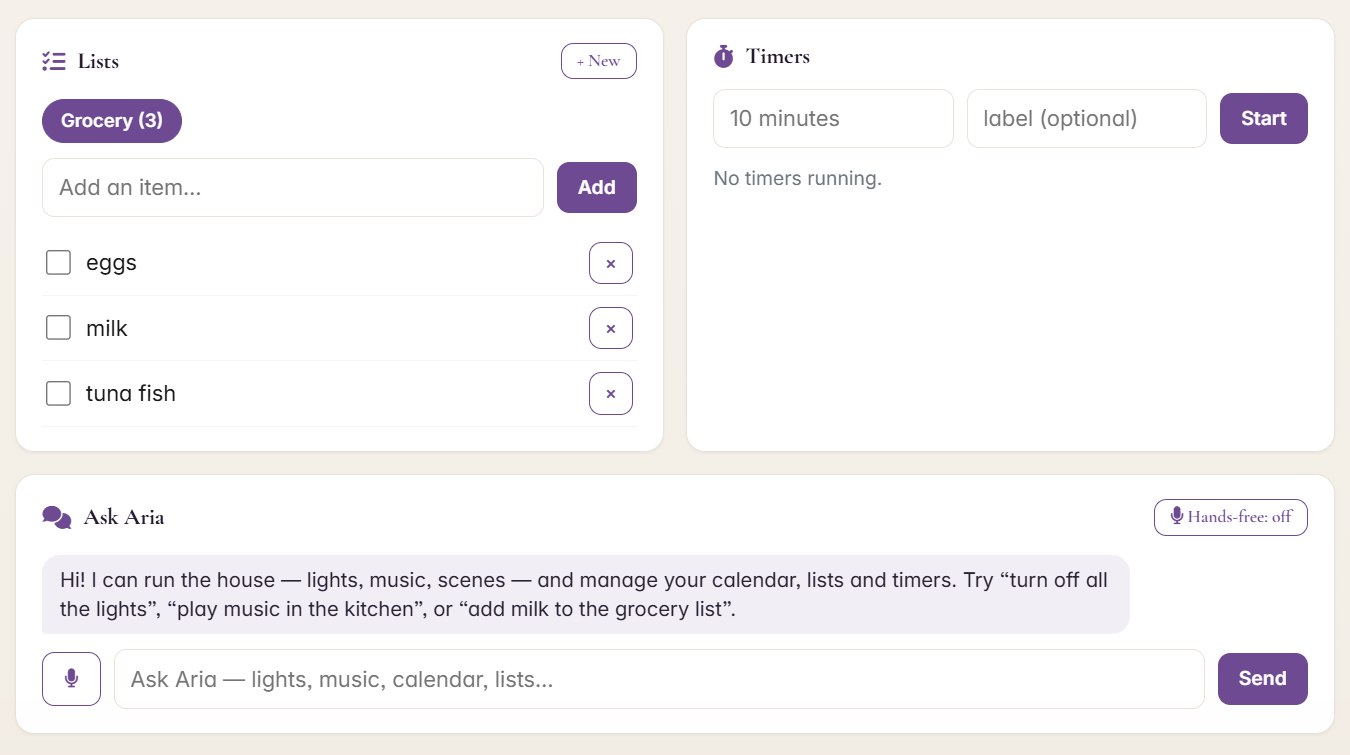
Aria Family Hub — shared grocery list with items, a timers card, and the Ask Aria chat with microphone and hands-free voice toggle
The Family Hub, as it runs today — the grocery list, timers, and Aria's chat with voice built in.
New · Voice & vision

Talk to her. Show her things.

Say it out loud.

"Hey Aria, movie lights." She hears you, does it, and answers out loud. Lights, scenes, music, TVs — from the couch, with your hands full, no phone required.

  • "Hey Aria" hands-free wake word, or tap-to-talk in the chat
  • Spoken replies, so you're not reading a screen across the room
  • Same brain as the dashboard — anything she can do, you can say

Snap a photo, ask a question.

The breaker label, the thermostat error code, the mystery part in the junk drawer — take a picture and ask. The answer comes from a vision model running on the Aria box in your house.

  • The photo never leaves your network
  • Works from the chat on your phone — snap, ask, done
  • Nothing uploaded, nothing used to train anyone's ads
New · Reliability

She takes care of herself.

01

Fixes her own hiccups.

When a camera stream drops at 2 a.m., Aria notices, restarts it, and logs what happened. Usually the first you hear of it is the note saying it's already fixed. No service call, no "have you tried rebooting it."

02

Runs in the house, not the cloud.

The brain is a box on your rack, not a server in Virginia. Your dashboard, automations, and voice keep working when the internet flickers — and your video and photos are processed at home.

03

Speaks up when it matters.

Add Aria to your phone's home screen and alerts land like texts — the leak sensor, the thermostat reading low, the camera that went quiet. Quiet hours respected. No noise for noise's sake.

Here's what that actually looks like.

Real screenshots from the home Aria runs in right now — not mockups.

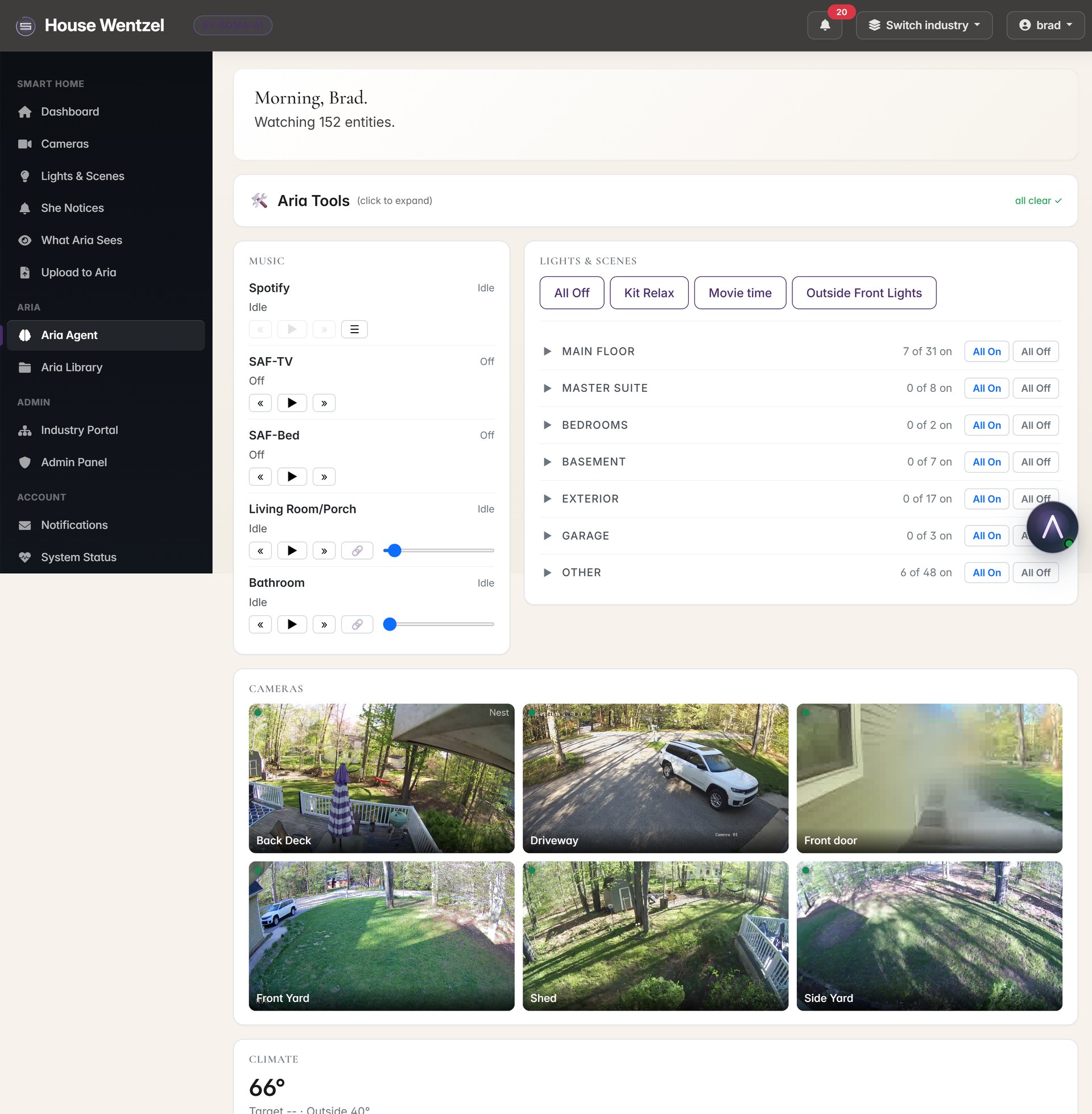
Top of the Aria dashboard — sidebar with Smart Home / Aria / Admin / Account sections, lights + scenes panel, music players for every Sonos zone in the house, all in one view
One dashboard. Lights, scenes, music, every zone — no app-switching.
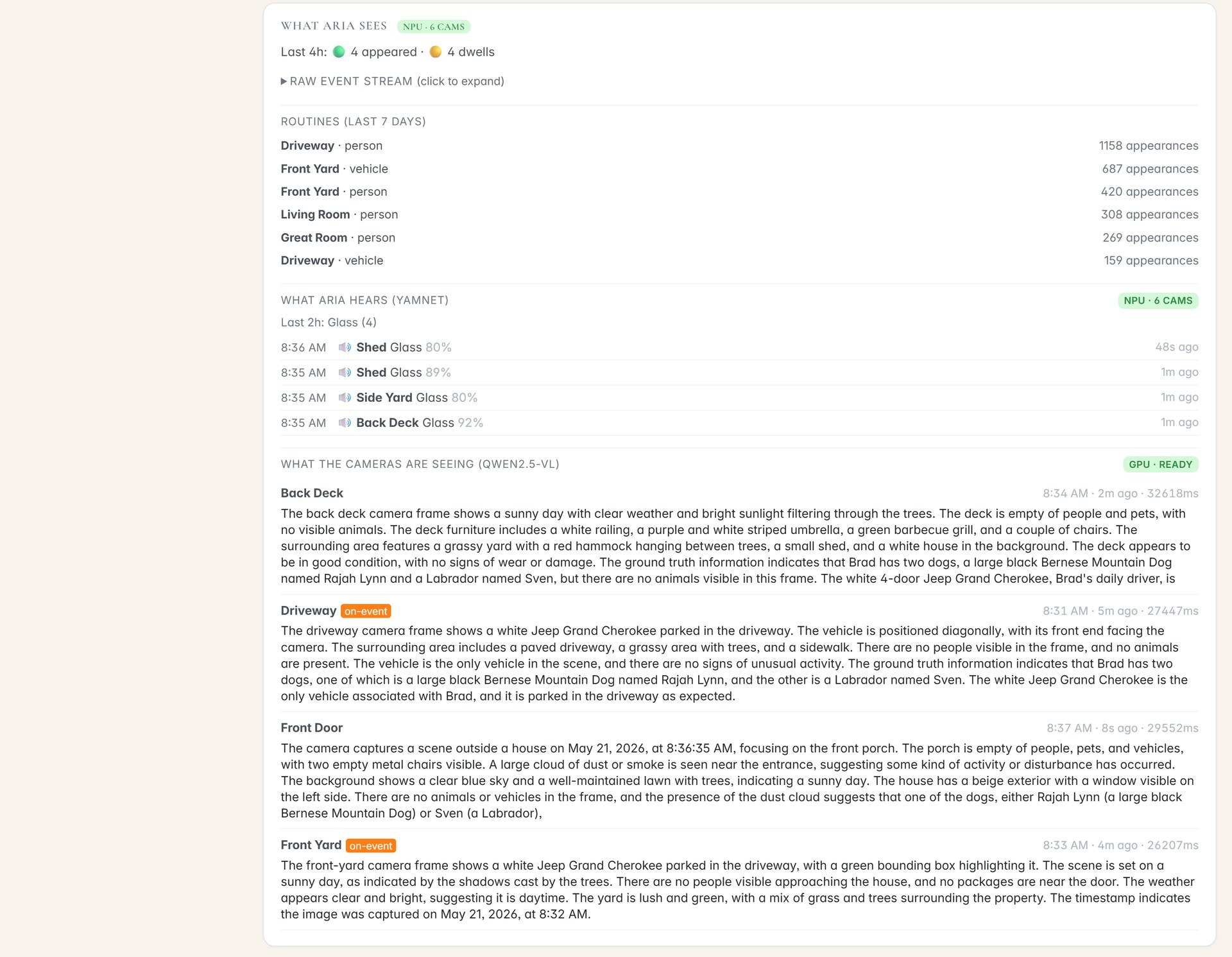
Aria's intelligence panel — live activity counters, audio events from each camera (dogs barking, vehicle horns, music), and AI scene descriptions from each camera (white Jeep Grand Cherokee in the driveway, two dogs on the back deck, etc.)
Aria sees and hears what's happening — and tells you in plain English.
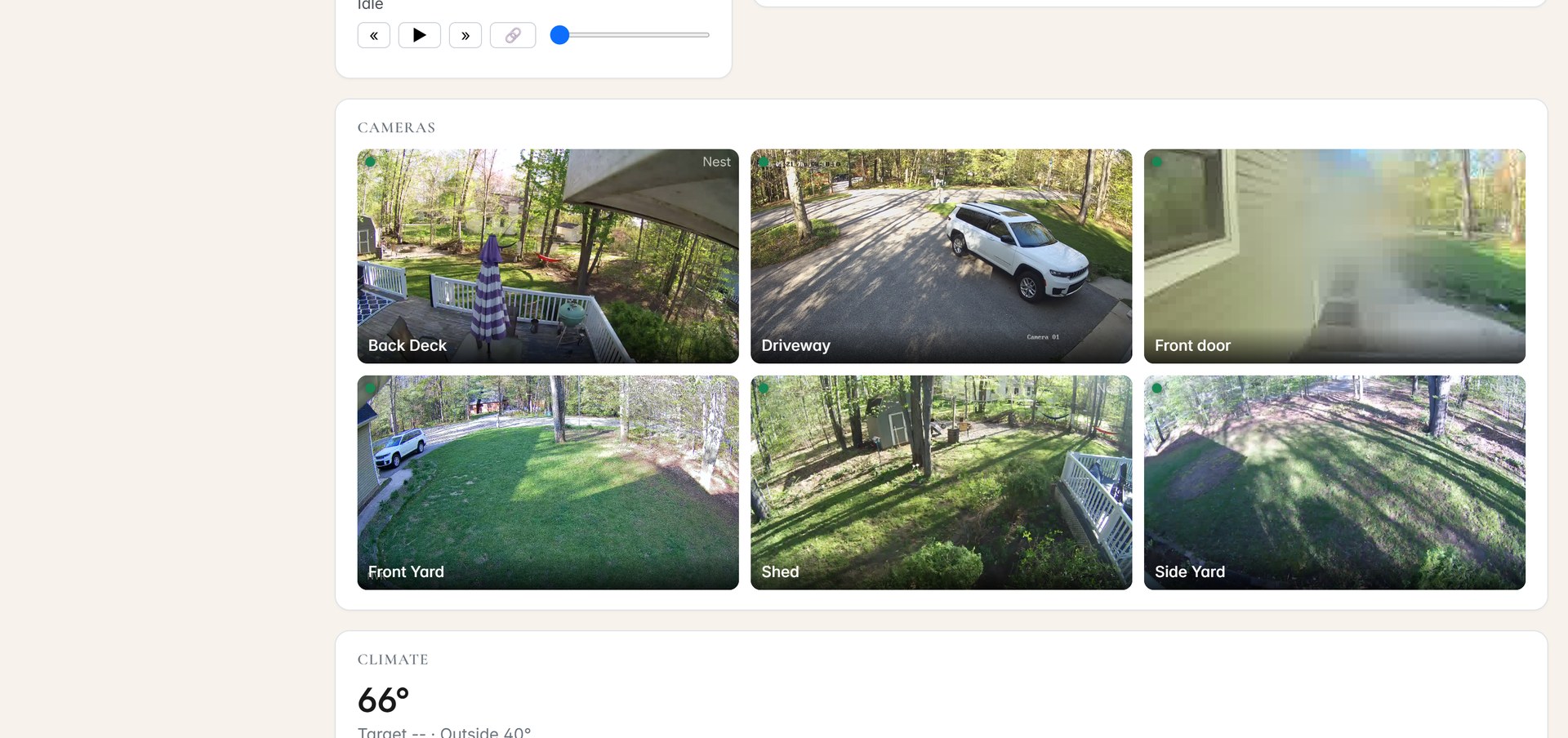
Aria's live cameras page — back deck, front door, living room, and shed cameras streaming live side by side
The live cameras page — every camera streaming on one page.

Three things you won't find anywhere else around here.

01

Aria actually learns your house.

Every smart-home system around here needs someone to program every routine. Aria watches how you actually live for a couple of weeks and offers to automate the patterns she sees — lake-side blinds at 7:30, front-porch lights off at 11, hot tub warming when you turn into the driveway. One tap accepts. She writes the rule. No programmer visit, no $250-an-hour charge, no "I'll get to it next month."

02

We don't replace what you already own.

Every other AV company in this area wants to rip your gear out and sell you new gear. We don't. Aria layers on top of what's already on your walls — Control4, Crestron HOME, Lutron HomeWorks, Honeywell, Nest, Sonos, whatever you have. You keep the hardware. Aria becomes the brain that finally makes it all work together.

03

You don't get a call center. You get me.

Most smart-home installs in this area come from companies an hour and a half away whose technicians might be back in six weeks if they remember. We're here. The number on your refrigerator magnet is the number of the guy who installed it. Same-day text response. Same person every time. No project managers, no escalation paths, no waiting two months for a Wednesday-afternoon appointment.

Works with what you already own. Here's the honest breakdown.

Most homes around here already have something installed. Some of it is recent and great. Some of it is fifteen years old and the dealer who put it in has retired. Here's what we can actually do, told straight.

Control4 (with a working Director)

We layer on top. Aria reads every light, scene, thermostat, and shade Control4 manages and can run all of them. Your keypads keep working. New automations live in Aria. The Control4 app fades into the background.

Crestron HOME (the newer prosumer line)

Same story as Control4. Aria layers via the HOME REST API. Reads rooms, scenes, and loads. Fires scenes, ramps lights.

Lutron HomeWorks QS or QSX

Yes, fully. QSX drops in next to Caseta. QS uses Lutron's integration protocol on the main processor — we'll need the .xml file from whoever originally programmed it. You keep all the Lutron hardware.

Lutron HomeWorks Illumination (pre-2009)

Doable but a custom job. We add a small bridge in the rack and write the driver. Plan on an extra day of bench work.

Older Crestron Pro / Master systems

Trickier. Needs the original programmer's source or a bridge module. We'll tell you straight on the site visit whether yours can be layered or if a different path makes more sense.

Control4 switches without a working Director

Honest answer: Control4's own dimmers need their Director running. If yours is dead, those switches are bricks. We swap them for Lutron — every other device in your house stays.

Reprogramming Control4 or Crestron themselves still requires their proprietary software. We're working on certification. Most customers find they never need to.

What Aria is not.

Aria is not a security system, not an alarm service, not a UL-listed monitor, and not a substitute for any monitored alarm contract or life-safety equipment.

Your Honeywell panel, your smoke detectors, your CO detectors, your alarm contract — all of that keeps doing its job exactly as it does today. Aria does not replace any of it.

What Aria does is pay attention for you and put it all in one place. She's the layer that makes everything else smarter. Treat her as an awareness and convenience tool, not life-safety equipment.

The same goes for the new parts. The camera grid is a window, not a guard — nobody is monitoring it but you. Voice and photos are processed in your home, not shipped to an ad network. And family logins are for convenience, not surveillance — everyone can see exactly what they're sharing.

How it goes.

/01

Site visit

We come look at the house. Thirty minutes. Free. We list every device you already have and which ones we can integrate.

/02

Pre-configured at the shop

Your Aria appliance gets built and tested on our workbench with the integrations ready. The visit at your house is mostly cosmetic.

/03

One afternoon install

We mount the box, wire it in, set up your app, and walk you through it. You'll know enough to use it by the time we leave.

/04

Thirty-day tune-up

Aria learns your house. We come back, see what she figured out, tune the alerts and routines together — and set the family up with their own logins.

What it costs.

There's a one-time install fee and a monthly service fee. Both depend on the size of your house and what you already have on the walls — a one-bedroom condo with three Lutron switches and a Sonos is not the same job as a Bay Harbor compound with Control4, four cameras, and a Honeywell panel.

Either way, it costs far less than a new Control4 system. There are no project managers, no surprise change orders, no $40,000 quotes sliding into your inbox on a Friday. The 15-minute call covers pricing — flat numbers, no games.

Service is month-to-month. Cancel anytime. The hardware is yours. If we're not doing right by you, you don't owe us anything past the last month you paid.

No project managers. No change orders. No $40,000 quotes.

Get in Touch

Text me to schedule a visit — your house, your schedule.

No sales pitch. No slide deck. I'll show you how Aria works in my own home, walk through yours, and explain exactly what an installation would look like using the devices you already have.